When a phone gets hacked, the spam doesn't leave your company.
Most mailbox break-ins start with a phone's saved password. DP Mail checks every outgoing message against how that person normally writes. If an account suddenly behaves like a hijacked one, the mail is held before it goes out, only that phone is signed out, and the owner sorts it out in one click.
What Ananya sees in her mailbox, and in a flagged email. Her admin gets the same alert. Try the buttons.
This is what your team works in every day
Screens from the DP Mail webmail itself. Switch between them to see the inbox, the hijack alert, the review screen, writing a message and the phone layout.
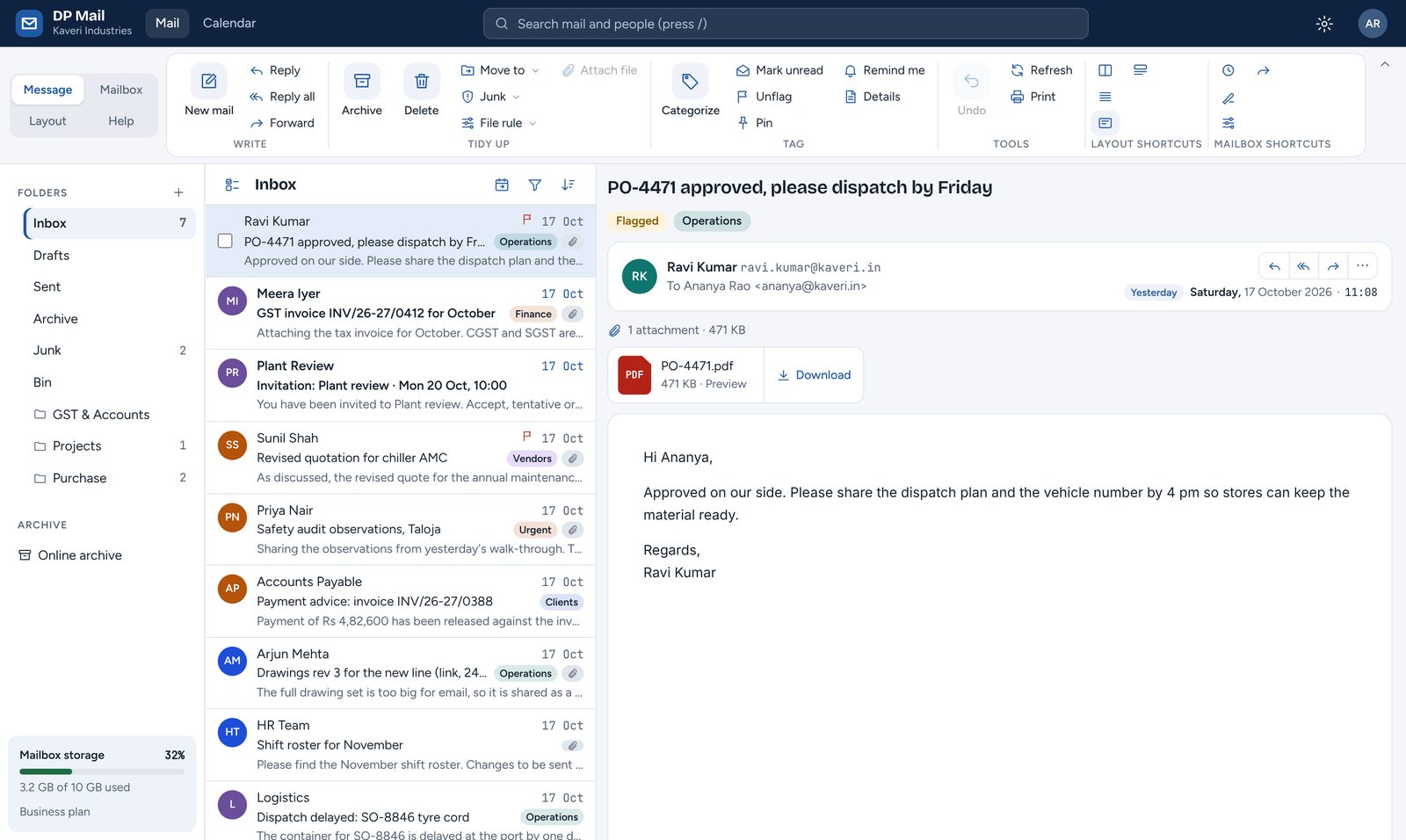
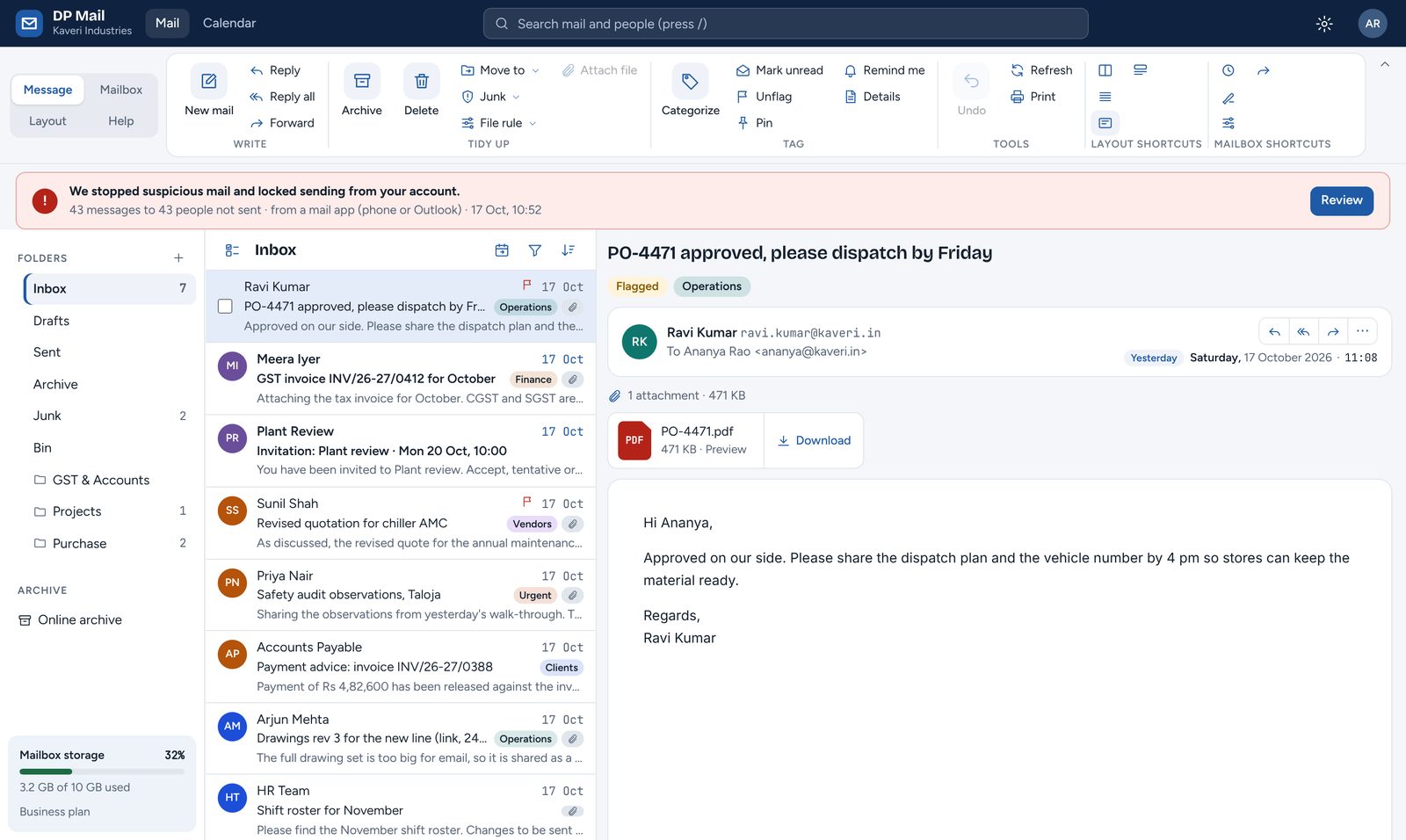
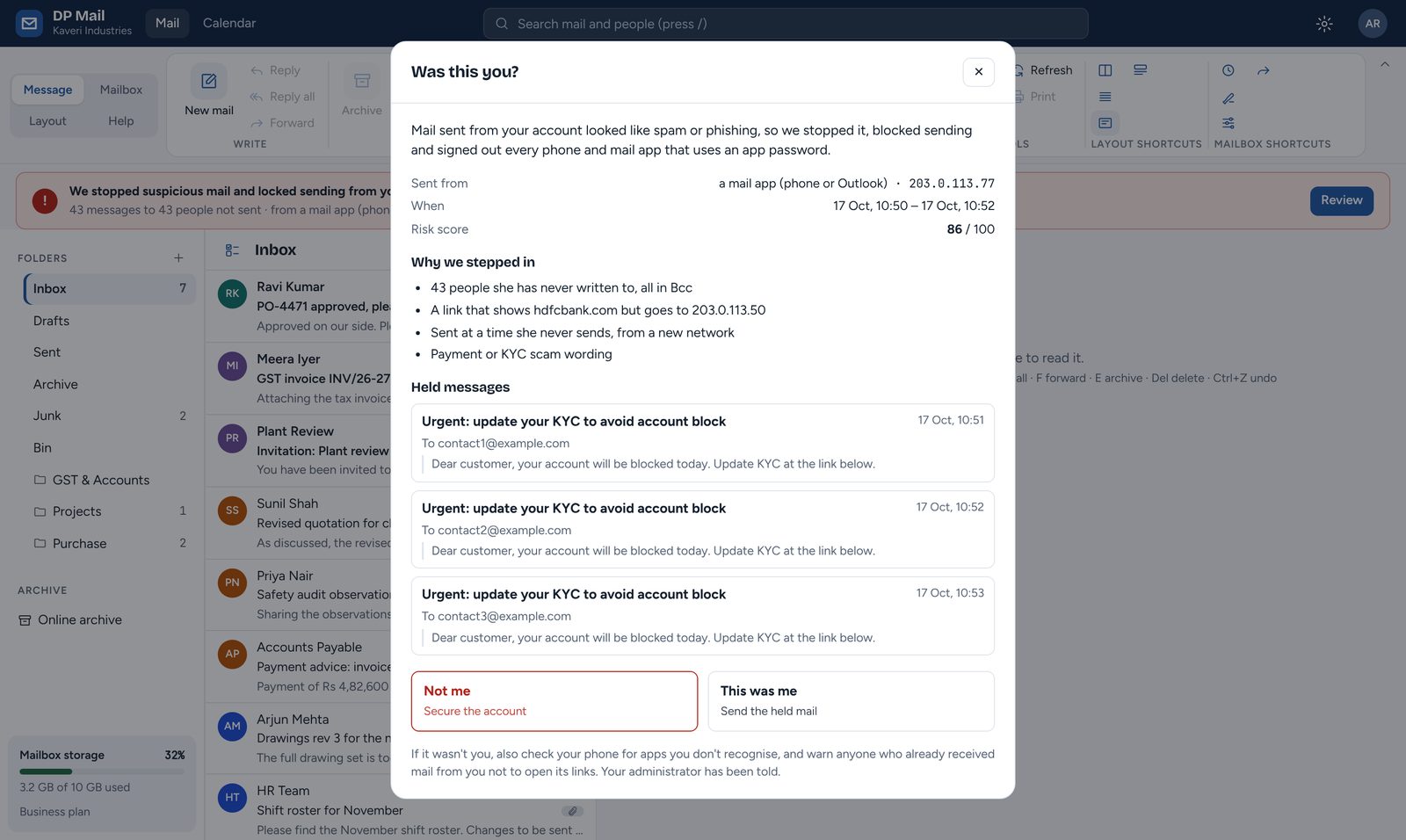
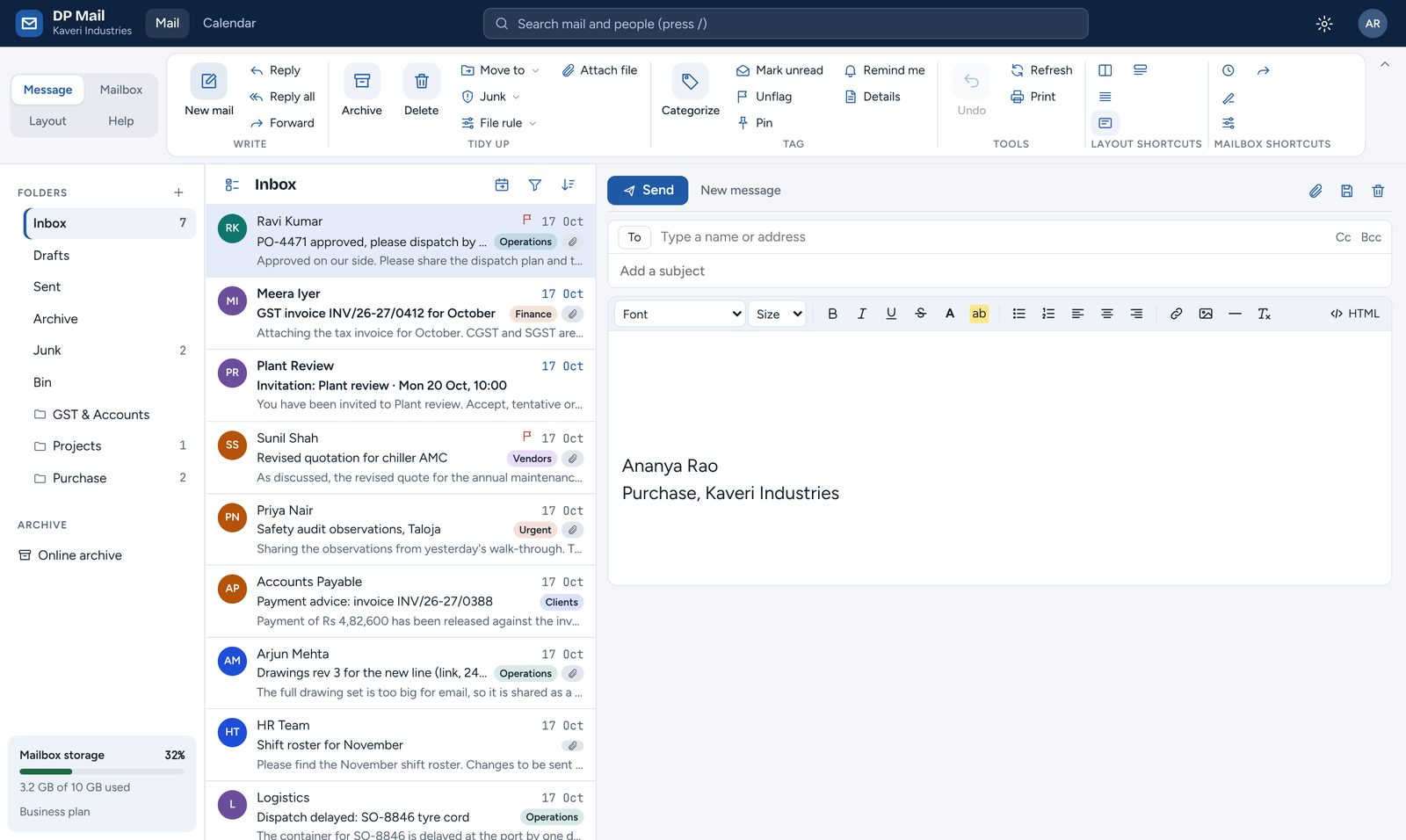
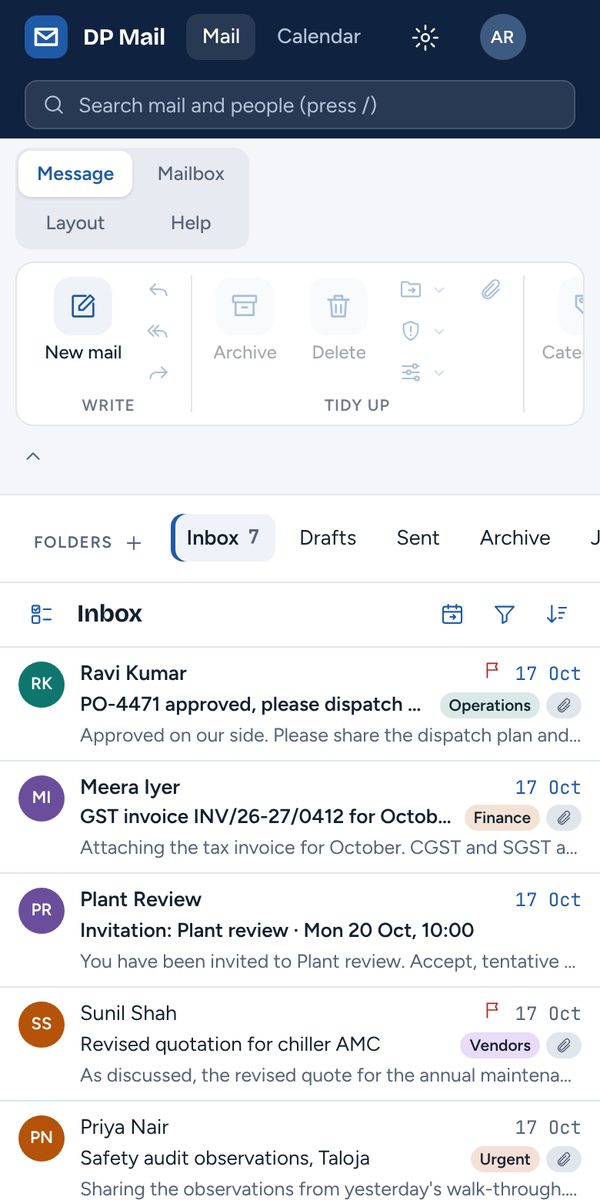
Screenshots of the DP Mail webmail with sample company data. Click through it yourself in the live demo ↗
Stopped before it is sent, not cleaned up after.
A hacked mailbox costs more than spam: your domain lands on blocklists, customers get fake invoices in your name, and nobody on the team can reach anyone for days. DP Mail treats it as an emergency the moment it starts.
Every message, against that person's own habits
Volume against their busiest normal hour, recipients they have never written to, mass Bcc, a network their phone has never used, an unusual hour, disguised links and payment or KYC scam wording.
Suspicious mail waits, quietly
The hacked phone is told the mail was sent, so the attacker learns nothing and does not switch tactics. In reality it is parked, unsent, until a person decides.
Only the leaking device is cut off
Each phone and laptop has its own app password. When one is clearly compromised, its password is revoked and sending is paused. The person's other devices and webmail keep working.
The owner settles it in one click
"This was me" sends the held mail and remembers the network. "Not me" deletes it, signs out every device and asks for a new password. No ticket, no waiting on IT.
Choose how strict DP Mail should be
Pick a mode and a sensitivity to see what happens to the same suspicious burst of mail. Every company sets its own level.
- Hold and lock: mail held and the device signed out (default)
- Hold only: mail held, device stays signed in
- Alert only: mail goes, the owner and admins are told
- Low, medium or high sensitivity
Illustrative. Alerts go straight into mailboxes, so they cannot be spoofed or lost in spam.
Things that usually cost an add-on, a second vendor or a script.
Email archive inside the mailbox
Every message kept in MailVault, searchable from the same webmail. Users only ever see their own archive.
Big files go as links
Attach drawings or site videos up to 2 GB. Anything over 25 MB is sent as a download link that expires in 30 days.
Calendar and "remind me"
Meetings with Yes / Maybe / No, reminders on any email, pop-up and email alerts, and sync to iPhone and Android.
Move in without losing anything
Copy mailboxes from Microsoft 365, Google Workspace or any IMAP server, for the whole company at once or person by person.
Billing the Indian way
Per-user plans in rupees, proper GST tax invoices (CGST + SGST or IGST), and payment by UPI, card or bank transfer.
Our cloud or your server
Run on DPinfotech’s hosting in India, or install on your own server with a signed licence key. Same product either way.
Delivery pace for outgoing mail
Set how many messages a minute or an hour leave for outside addresses, for the whole company or one mailbox. Mail sent in a burst waits in the queue and goes out evenly; nothing is refused, and mail to colleagues is never held.
An Outbox people can see
Everyone sees their own mail that has not left yet: waiting its turn, being retried or failed, with each recipient's status. They can stop a message before it goes, without calling IT.
Group addresses and newsletter lists
sales@ or all@ reaches every member, and you decide who may write to it. Newsletters go to customers one personal copy at a time, with one-click unsubscribe that is always honoured.
See where every message went, without asking us.
Company admins get their own mail flow and security pages for their domains. No support ticket to find out why a customer did not get an invoice.
| Time | To | Status | Server reply |
|---|---|---|---|
| 10:42 | accounts@customer.example | Delivered | 250 OK queued |
| 10:39 | purchase@vendor.example | Deferred | 451 try again later |
| 10:31 | old.contact@client.example | Bounced | 550 mailbox not found |
| 10:27 | hr@partner.example | Delivered | 250 2.0.0 accepted |
Delivered, queued, deferred and bounced, per message and per recipient, with the remote server's reply.
Hourly caps, automatic blocks after too many bounces, and a clear reason when someone is paused.
sales@, accounts@ or all@ for each team, with members inside or outside the company, closed to outsiders unless you open it.
Bulk sends leave the queue evenly, at the pace you set for the company or for one mailbox, so receiving servers do not throttle or block you.
People can only send as themselves. SPF, DKIM and DMARC are checked for every domain, with the exact DNS records to add.
Repeated failed sign-ins lock the attacker's address out; two-step sign-in with an authenticator app for anyone.
Add people one by one or from a CSV, sign out a lost phone, and see seats and invoices in one place.
Every admin action recorded in a chained log that can be checked for edits.
Webmail your team already knows how to use
Webmail that looks and works like the Outlook your team already knows, and works with the mail apps they already use.
- Ribbon toolbar and reading pane
- Rules, automatic replies, signatures
- Fast search across folders
- Undo send, snooze, pin and flag
- Outlook, iPhone and Android mail apps
- Your company’s colours and themes
Everything included, and what it does for you.
Hijacked-account protection7
- Every message checked against the sender's habits — a hacked phone is caught in its first message or two
- Suspicious mail held before it leaves — no fake invoices to customers, no blocklisted domain
- Hacked phone told "sent" — the attacker learns nothing
- One app password per device; only the hacked one is cut off — work carries on
- Owner decides in one click — fixed in minutes, no IT ticket
- Alerts to the owner and admins, inside the mailbox — cannot be faked or lost in spam
- Hold and lock, hold only or alert only, three sensitivities — each company picks its level
Sending controls and security9
- Newsletter lists with one-click unsubscribe — customer updates go out paced, and people who opt out are never mailed again
- Hourly limits; automatic block on bursts or bounces — one bad account cannot hurt everyone's delivery
- Delivery pace per company or per mailbox — bulk sends leave evenly from the queue, so receiving servers do not throttle or block you
- Send only as yourself — nobody can pose as the CEO or accounts
- SPF, DKIM and DMARC checks with the exact DNS records — mail lands in inboxes, not spam
- Password-guessing lockout and sign-in limits — stops brute-force attacks
- Two-step sign-in with an authenticator app — a stolen password is not enough
- Inbound spam, phishing and virus filtering — fewer scams reach people
- Leaked-password check (optional) — known exposed passwords are refused
Webmail8
- Outlook-style ribbon, reading pane, phone layout — little or no training
- Fast search, filters, sorting, conversation view — find mail in seconds
- Rules, scheduled automatic replies, signatures, forwarding — routine work runs itself; outside forwarding off by default
- Flag, pin, categories, snooze, undo send, undo — fewer mistakes, tidier inbox
- Outbox with each message's delivery status — people see what is still waiting and can stop it, without calling IT
- Blocked and trusted senders, outside pictures held back — no tracking, safer reading
- Auto-archive by age or year; auto-empty Bin and Junk — mailboxes stay within quota
- Keyboard shortcuts and company themes — fast for power users, on-brand for everyone
Calendar, reminders and large files7
- Day, week, month and agenda views; repeating events — email and schedule in one place
- Invitations with Yes / Maybe / No and who is coming — works with Outlook, Gmail and phones
- Invitation card in the mailbox — reply in one click
- "Remind me" on any email — follow-ups never slip
- Pop-up and email reminders with snooze — no missed meetings
- Calendar and contacts sync to iPhone and Android — the same diary everywhere
- Files up to 2 GB sent as expiring links; Shared files page — drawings and videos go through, and you can stop a link later
Mail apps, archive and moving in6
- Outlook, iPhone, Gmail app, Thunderbird with automatic setup — people keep the apps they know
- People add and remove their own devices — a lost phone is removed in seconds
- Email archive (MailVault) searchable inside webmail — ready for audits and disputes
- Each person sees only their own archive — privacy kept
- Copy mail from Microsoft 365, Google Workspace or IMAP — switch without losing history
- Whole company or person by person, with progress — no manual copying, no guesswork
Administration, billing and hosting8
- Users by hand or CSV, roles, sign out a person's mail apps — admin work in minutes
- Group addresses (sales@, all@) with who may send to them — one address per team, closed to outsiders unless you open it
- Domains with exact DNS records, checked automatically — setup without guesswork
- Mail flow for your own domains: delivered, queued, paced, deferred, bounced — answer "why didn't they get it?" yourself
- Security page: incidents, held mail, sign-ins, sending policy — one place to see threats
- Rupee plans, GST tax invoices, UPI, card or bank transfer — invoices your accountant can file
- Pro-rata charges for added seats; tamper-evident audit log — fair bills, provable records
- Our hosting in India, or your own server with a licence key — your data where you need it
See a hijack get stopped, live.
In a 20-minute demo we send phishing from a "hacked" phone and you watch DP Mail hold it, sign the phone out and alert the owner. Then we plan your move from your current provider.